

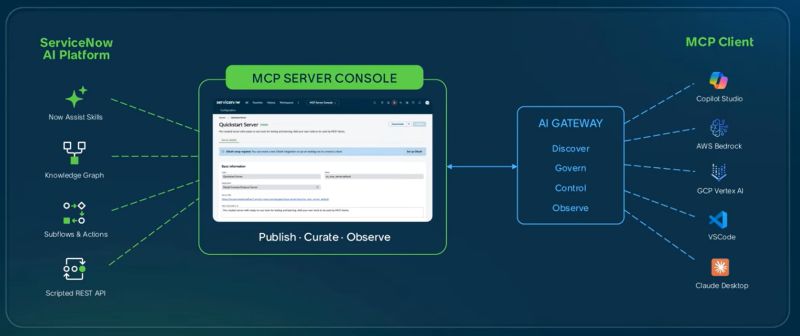
ServiceNow MCP Server
Expose governed ServiceNow tools and workflows to AI agents through the Model Context Protocol.
Authentication details
This API uses two security controls:
- Apigee/Gravitee API key validation through the X-API-Key request header.
- ServiceNow OAuth 2.0 Authorization Code authentication using a Bearer access token.
Both controls are required. A valid API key does not replace the OAuth access token, and an OAuth token does not replace the API key.
Access also depends on table-level MCP configuration, permitted operation types, and applicable ServiceNow authorization and ACL controls.
Guidelines on how to use this API
Consumers must complete both API gateway onboarding and ServiceNow OAuth client registration before calling the API.
Step 1 - Request access and subscribe
Go to the Plan of Usage section and select Get Access. Create your application/subscription for the appropriate plan. Once access is granted, the generated Key is your API Key.
You can view your credentials at any time under Profile → My Apps.
Step 2 - Configure the Gravitee API key
Include the issued API key in API request using this HTTP header:
X-API-Key: <apikey value>Gravitee validates the API key at the gateway. Requests without a valid key may be rejected before reaching the ServiceNow API.
Keep the API key confidential. Do not expose it in browser code, public repositories, client-side applications, or logs.
Note: Refer to the Specification section to know more about the authentication and how to pass the API Key in your request.
Step 3 - Coordinate OAuth registration with MSI
Contact the MSI team to obtain the OAuth client registration details, including the client_id and client_secret, through the approved organizational process.
Consumers must provide MSI with the exact redirect URL of their application. This is the callback URL to which the OAuth authorization response is returned after the user authorizes the application.
MSI uses the supplied redirect URL to configure or map the OAuth application registration accordingly. The redirect URL used during authorization must match the URL registered for that client.
Step 4 - Obtain an OAuth access token
Use the registered OAuth client and the ServiceNow OAuth 2.0 Authorization Code flow to obtain an access token. Complete the authorization flow through the configured ServiceNow authorization endpoint and exchange the authorization code at the token endpoint.
The OAuth access token and the Gravitee API key serve different purposes. The API key validates gateway subscription access; the OAuth token identifies and authorizes the caller according to the ServiceNow OAuth and authorization configuration.
Step 5 - Call the API
Send both required security credentials with every request:
X-API-Key: <apikey value>
Authorization: Bearer <access_token>
Copy
Use GET /records/{tableName} to search records and GET /records/{tableName}/{sys_id} to retrieve a specific record.
References
Release notes
SNW_MCP_1.0
Initial Release of Snow MCP Product